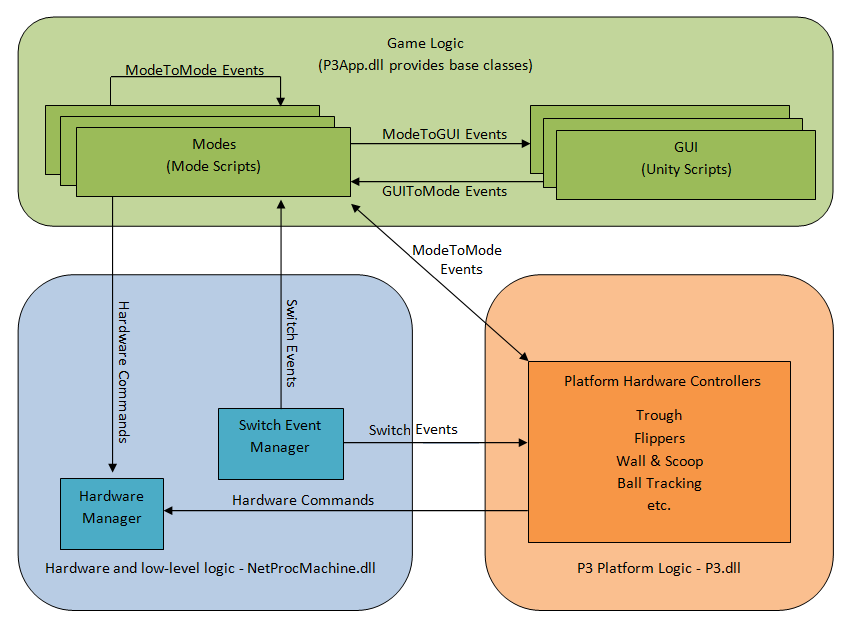
The Layers: Mode and GUI
All administrative activities need to happen in the mode layer. This includes things like starting the game, keeping score, ball counting, deciding which player should be playing, deciding when to change scenes, etc. Importantly, all communication with the mechanisms needs to happen in the mode layer. Think of the mode layer as the decision-making side, the business logic.
All of the audio/visual activities need to happen in the GUI layer. This includes all the visual aspects of the game, plus things like triggering sounds, virtual object collision detection, showing the score, popup messages, etc. Think of the GUI layer as the displaying and notifying side.
Most of the responsibility for actually running the game lies in the mode layer. Most things that happen in the GUI layer should only happen because a mode sent an event to the UI. If the UI needs to trigger something, it should send an event to the mode layer to let the modes decide what should happen next (which will likely result in more events). This may seem like it's introducing extra event traffic, but organizationally and thread-wise, it's essential. It's easy to fall into the trap of letting your GUI layer take on too much responsibility. When in doubt, ask "who directs this action?". The answer should almost always be "the modes".
Modes
The concept of modes inside a pinball game should be familiar. Multiball mode or double-scoring mode would be common examples in modern pinball machines. On the P3 platform, modes are the implementation of the rules of the game, how the game proceeds, and how mechanisms are handled.
The P3 framework uses modes to drive almost everything, even outside of the player's game. For example, there is also a service menu mode, attract mode, and coin-taking mode. There are also modes to interact with each of the mechanisms in the machine- both built-in and those that are part of a playfield module.
Modes receive events from the hardware to notify of switch activity and can control the hardware by firing similar events. A mode can also communicate with the GUI layer or other modes via events.
Logically, a mode can be started and stopped. While running, it has some purpose or activity to be administered. In general, the more focused a mode's purpose is, the easier it will be to understand, debug, modify, and reuse. It is best to avoid overly complicated modes that try to handle many things at once.
Modes are stackable to assist with this separation of tasks. For example, you could have multiball and double-scoring mode active simultaneously. An in-game mode with complicated rules could be controlled by several modes running simultaneously.
Modes also have priority. For example, a hurry-up mode may temporarily override a scoring feature mode.
Modes can cause other modes to be created, started or stopped. Some modes could be considered to be the parent of other modes. Some modes may lock out other modes or prevent them from starting.
Once instantiated, a mode can be started and stopped any number of times.
An Analogy For The Framework
A structure of a P3 app can be loosely thought of using a theatrical production as an analogy.
| Theatrical element | Responsibilities | P3 Framework Equivalent |
|---|---|---|
| Producer | Provide a working environment for the directors | P3Controller object |
| Director | Manage the subdirectors, oversee everything. | Mode object (specifically, base app mode) |
| Subdirectors (e.g. lighting director, musical director, extras director) | Manage a focused portion of the production. | Mode objects (e.g attract mode, multiball mode) |
| Director's megaphone | Communicate from director to stage manager and actors | Events (specifically, from the modes to the GUI) |
| ⇧Administration ⇩Presentation | ⇧Conducting ⇩Entertaining | ⇧Mode layer ⇩GUI layer |
| Stage/Set | Provide a place for the audio/visual action to play out | Unity scene |
| Stage manager | Manage the placement of scenery and actors | SceneController object |
| Actors | Follow stage manager and directors' instructions, look good, interact with other actors | P3Aware objects, Unity GameObjects |
| Radio headsets | Communicate from stage to directors | Events (specifically, from the GUI to the modes) |
Note the separation at the green line. In a P3 app, this separation is critical to ensure safe memory management. The mode layer activities occur in a separate thread from the GUI layer activities. Communication is achieved via events which are broadcast from the mode layer to the GUI layer (or vice versa). Event handlers react accordingly. Modes can also send events to each other on the mode layer.
Additional References: