A virtual target is a GameObject that can detect collisions between itself and the ball avatar.
In this tech tip, we will look at the virtual targets contained in the P3Playfield prefab and their associated modes.
You can find the P3Playfield prefab under Assets/Resources/Prefabs/Framework in P3SampleApp.
The P3Playfield is instantiated by Setup, the base class of P3SASetup.
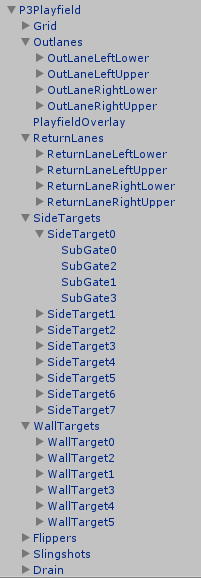
Here is the list of GameObjects within P3Playfield.
A virtual target can be as simple as a Rigidbody with a Collider as documented in the Ball Collision Detection section of the SDK Developer Guide. The Drain target is an example of that.
The other virtual targets in the P3Playfield prefab are instances of the Gate prefab.
A Gate is made up of 4 SubGates (0 to 3) corresponding to the front, back, and 2 flanking posts. The SubGates are visible under SideTarget0 in the picture above because the parent has been expanded. The Gate does not have a Collider but the SubGates do. The Gate can determine whether it was hit forwards or backwards depending on the order the front and back were hit. When the Gate is unidirectional, it considers only forward hits and behaves like a virtual one-way gate. When the Gate is bidirectional, it considers both forward and backward hits and behaves like a virtual rollover switch.
Optionally, the Gate can be configured to cancel the hit if one of the flanking posts is hit. This simulates the ball bouncing off the post and missing the target. Of course, the physical ball continues on its path in a straight line.
The Gate sends the configured Event Name when it detects a hit. The event data is the Gate Id as a string.
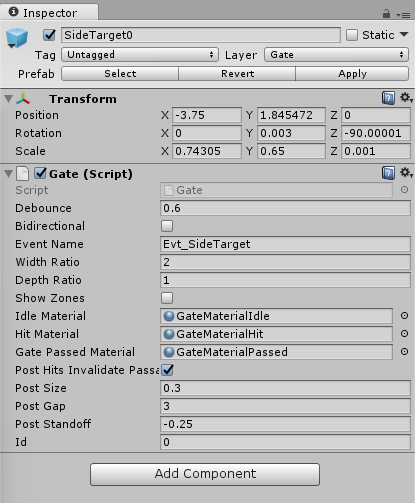
In the SideTarget0 example below, the Gate is unidirectional (Bidirectional is false), the Event Name is Evt_SideTarget, the flanking posts invalidate the gate hit (Post Hits Invalidate Passage is true), and the Gate Id is "0".
A Gate does not have an interesting rendering since it is intended to be invisible. The application can add separate objects to the scene to give a visual appearance to the Gate.
The icons next to the side targets come from the SideTargets prefab in the Home scene. Each icon comes with a highlight to give it a star halo.
The icons over the inlanes and outlanes come from the LaneCollection prefab in the Home scene. Each icon also has an "off" (greyed-out) version. The icons have a HUDElement script component that responds to Evt_State<id> events to enable or disable the icon.
This diagram shows the location of the virtual targets contained in P3Playfield relative to each other over the playfield screen.
W0 W1 W2 W3 W4 W5
T3 T7
T2 T6
T1 T5
T0 T4
\OLU\RLU\ /RRU/ORU/
\ \RLL\ /RRL/ /
\ \ / /
\OLL\O=== ===O/ORL/
\______Drain______/
Diagram Abbreviation | Target Name |
WN | WallTargetN (N=0..5) |
TN | SideTargetN (N=0..7) |
OLL | OutLaneLeftLower |
OLU | OutLaneLeftUpper |
ORL | OutLaneRightLower |
ORU | OutLaneRightUpper |
RLL | ReturnLaneLeftLower |
RLU | ReturnLaneLeftUpper |
RRL | ReturnLaneRightLower |
RRU | ReturnLaneRightUpper |
Drain | Drain |
A GUI event is sent by the GUI to the modes. GUI event handlers do not have a priority and they cannot cancel the event with EVENT_STOP. You sometimes see a GUI event handler react by posting a mode event to modes, because mode events have priorities and can be cancelled with EVENT_STOP.
VirtualShotsMode is a mode that listens to some GUI and switch events and reposts them as mode events. VirtualShotsMode changes the event name slightly and also changes the event data when it reposts, but this is not mandatory in general. A GUI event and a mode event of the same name are kept separate.
VirtualShotsMode does not repost the GUI events from the WallTargets. In fact, no modes handle the Evt_Wall event in P3SampleApp (nor in the SDK itself).
VirtualShotsMode is created in P3SABaseGameMode and is started when P3SABaseGameMode starts.
This table lists the GUI and Switch events VirtualShotsMode listens for and which mode events it posts in as a result.
Diagram Abbrev | Gate Name | Bidirectional | Post Hits Invalidate Passage | GUI or Switch Event | GUI Event Data | Mode Event Posted by VirtualShotsMode | Mode Event Data |
W0 | WallTarget0 | false | true | Evt_Wall | "0" | N/A | N/A |
W1 | WallTarget1 | false | true | Evt_Wall | "1" | N/A | N/A |
W2 | WallTarget2 | false | true | Evt_Wall | "2" | N/A | N/A |
W3 | WallTarget3 | false | true | Evt_Wall | "3" | N/A | N/A |
W4 | WallTarget4 | false | true | Evt_Wall | "4" | N/A | N/A |
W5 | WallTarget5 | false | true | Evt_Wall | "5" | N/A | N/A |
T0 | SideTarget0 | false | true | Evt_SideTarget | "0" | Evt_SideTargetHit | int 0 |
T1 | SideTarget1 | false | true | Evt_SideTarget | "1" | Evt_SideTargetHit | int 1 |
T2 | SideTarget2 | false | true | Evt_SideTarget | "2" | Evt_SideTargetHit | int 2 |
T3 | SideTarget3 | false | true | Evt_SideTarget | "3" | Evt_SideTargetHit | int 3 |
T4 | SideTarget4 | false | true | Evt_SideTarget | "4" | Evt_SideTargetHit | int 4 |
T5 | SideTarget5 | false | true | Evt_SideTarget | "5" | Evt_SideTargetHit | int 5 |
T6 | SideTarget6 | false | true | Evt_SideTarget | "6" | Evt_SideTargetHit | int 6 |
T7 | SideTarget7 | false | true | Evt_SideTarget | "7" | Evt_SideTargetHit | int 7 |
OLL | OutLaneLeftLower | true | false | EVT_OutLaneLeftLower | "0" | Evt_OutlaneLeftLower | false |
OLU | OutLaneLeftUpper | true | false | EVT_OutLaneLeftUpper | "1" | Evt_OutlaneLeftUpper | false |
ORL | OutLaneRightLower | true | false | EVT_OutLaneRightLower | "2" | Evt_OutlaneRightLower | true |
ORU | OutLaneRightUpper | true | false | EVT_OutLaneRightUpper | "3" | Evt_OutlaneRightUpper | true |
RLL | ReturnLaneLeftLower | true | false | EVT_ReturnLaneLeftLower | "0" | Evt_InlaneLeftLower | false |
RLU | ReturnLaneLeftUpper | true | false | EVT_ReturnLaneLeftUpper | "1" | Evt_InlaneLeftUpper | false |
RRL | ReturnLaneRightLower | true | false | EVT_ReturnLaneRightLower | "2" | Evt_InlaneRightLower | true |
RRU | ReturnLaneRightUpper | true | false | EVT_ReturnLaneRightUpper | "3" | Evt_InlaneRightUpper | true |
Drain | N/A | N/A | N/A | Evt_DrainCollision | null | N/A | N/A |
N/A | N/A | N/A | N/A | sw_slingL_active | sw | Evt_LeftSlingHit | sw |
N/A | N/A | N/A | N/A | sw_slingR_active | sw | Evt_RightSlingHit | sw |
LanesMode handles the mode events sent by VirtualShotsMode to manage the lower lanes. It only considers the 4 lower lane virtual targets and ignores the 4 upper lane virtual targets. LanesMode keeps the state of each lane (i.e. whether it has been hit yet). This state is preserved in the player’s data to be restored when the player starts his next ball. When a lane is hit, it becomes activated, which causes it to flash for a short time. The flashing is done by sending the event Evt_State<iconName> with a bool as event data. The HUDElement component of the icon receives the event and enables or disables the icon accordingly. Pressing left button2 or right button2 rotates the lanes left or right.
When all 4 lanes are hit, it increases the number of completions by 1. If the number of completions reaches certain thresholds, an award is given. The number of completions needed to earn the next award increases sharply as more awards are given. There are only two possible awards in LanesMode: BonusX or Respawn. BonusX increments the bonus multiplier by 1. Respawn increments the Respawn count by 1 (respawns are virtual kickbacks when the ball drains below the lower flippers, see RespawnMode). Finally, the lanes are reset to start another completion cycle.
The application can send the Evt_EnableLanes event to enable or disable the lanes. In P3SampleApp, only MultiballMode and TiltedMode send this event. MultiballMode disables the lanes when multiball starts and re-enables the lanes when multiball ends. TiltedMode disables the lanes when the player has tilted while waiting for the balls in play to drain.
LanesManager is the GUI component that controls the UI for the lower lanes. LanesManager is created in P3SASceneController, much like BallSaveManager. LanesManager is passive: it receives events from LanesMode telling it what to do, and never sends an event.
The events Evt_AnimateLanesLeft and Evt_AnimateLanesRight tell LanesManager to play a sound with an animation showing the lanes rotating left or right. The sound plays correctly but the animation is commented out in P3SampleApp.
The events Evt_LaneActivated and Evt_LaneAlreadyActivated simply play a sound that is different depending on which lane was hit.
The event Evt_LanesCompleted attempts to schedule a sound, but the LanesCompletedEventHandler method is buggy: it never assigns awardSoundDelayTimer and the last “else if” should be an “else”.
SideTargetMode maintains the state of the 8 side targets (i.e. whether they have been hit already). This state is saved in the player data and is restored when the player starts his next ball.
SideTargetMode listens for the Evt_SideTargetHit event from VirtualShotsMode. If the target has not been hit already, SideTargetMode sends the event Evt_SideTargetHit to HomeSceneController, which plays a sound. The event data is a boolean indicating which side the sound should be played from: false for left, true for right. Finally, SideTargetMode sends the event Evt_SideTargetScore to P3SASceneController, which displays a floating score next to the target.
The number of targets that change state when a target is newly hit depends on the game attribute SideTargetDifficulty: 0 means easy (group of 4 targets completed per hit), 1 means medium (group of 2 targets per hit), 2 means hard (1 target per hit).
The LEDs behind the side targets are named flasherSideModuleLeft<Num> and flasherSideModuleRight<Num> where <Num> is 0 to 3. The LED is flashing when the corresponding target has not been hit yet. The LED is steadily lit when the corresponding target has been hit. You can see this in the simulator by choosing Display 8 in Unity. This is done through LED scripts, which are well documented in the LEDs section of the SDK Developer Guide.
The GUI Inserts in front of the side targets are named SideTargetHighlight<Num> where <Num> is 0 to 7. The GUI Insert halo flashes green when the corresponding target has not been hit yet. The GUI Insert is solid green when the corresponding target has been hit. This is done through GUIInsert scripts. When the side target GUIInsert script command runs, it sends the Evt_RunGUIInsertCommandSideTargetHighlight<Num> event to the ColorReceiver component of the SideTargetHighlight<Num> GameObject in the Home scene. The ColorReceiver blinks the GameObject green or makes it solid green depending on the GUIInsert script command. See the GUIInserts tech tip for more information.
If a new hit completes all targets, SideTargetMode sends the event Evt_SideTargetComplete. In P3SampleApp, HomeMode handles this event and reacts by starting multiball.