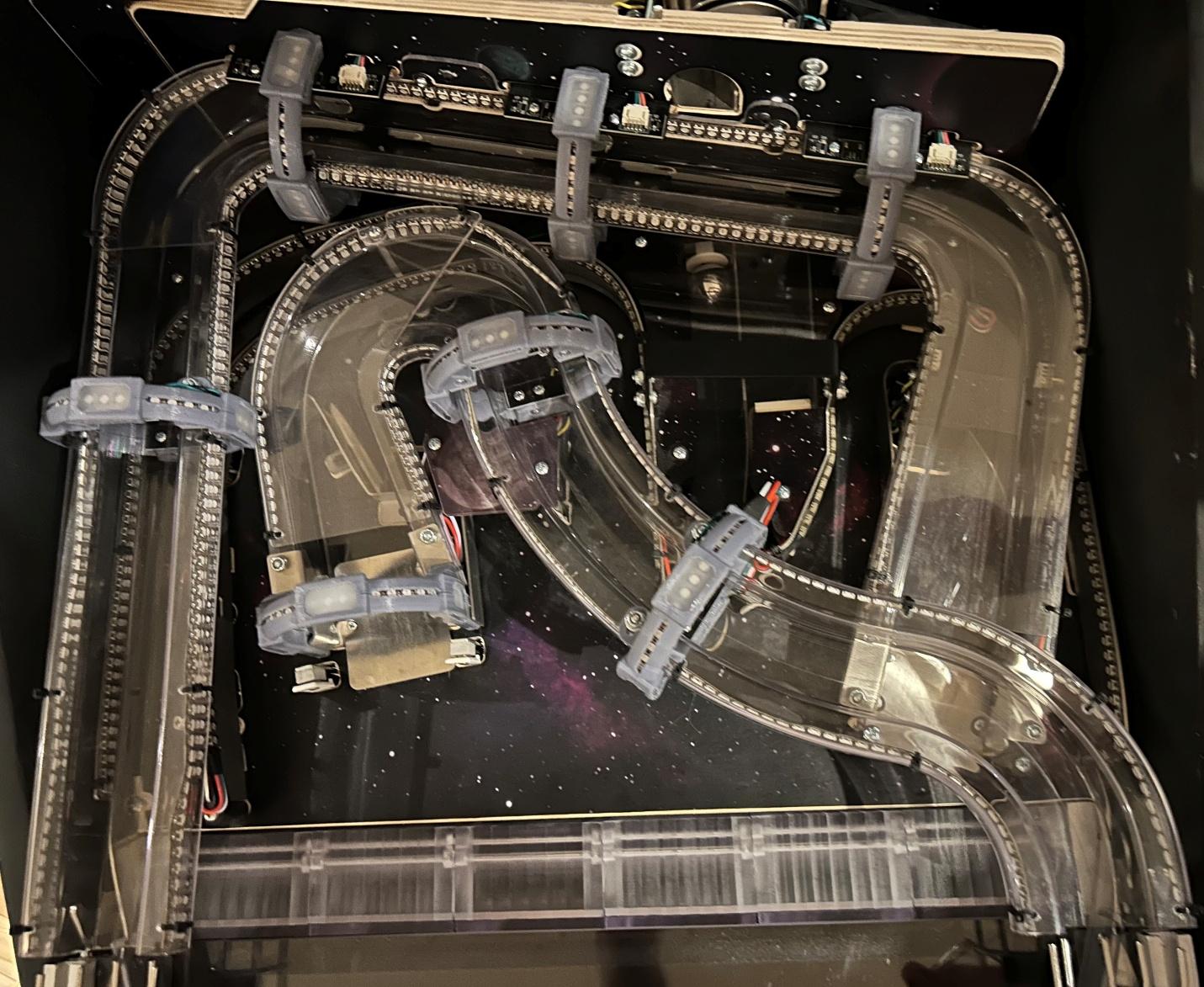
The Cosmic Cart Racing module contains over 900 individually controlled LEDs.
The physical features section of the SDK Developer Guide documents how to control LEDs.
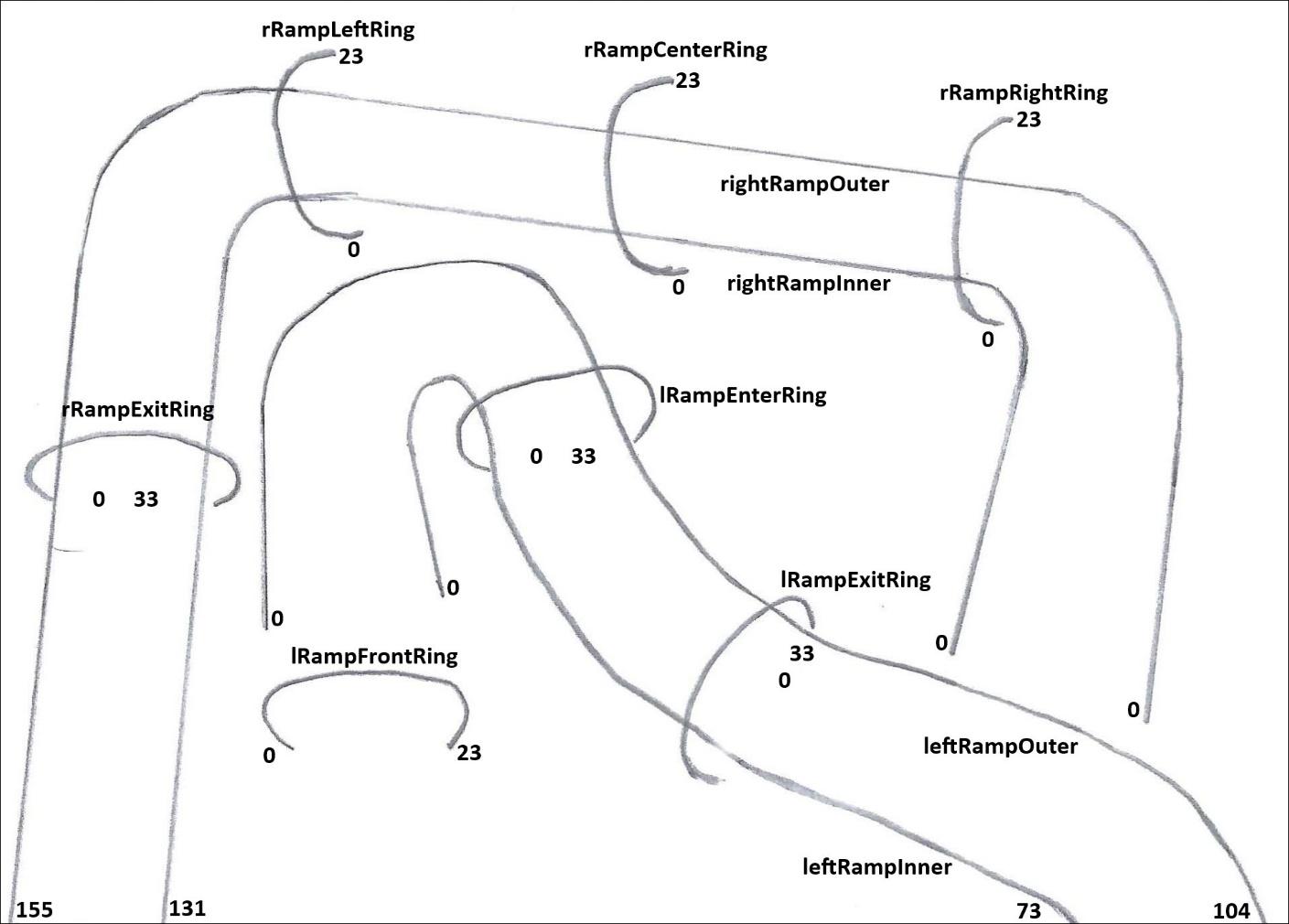
The left and right ramps have LED strings along both sides:
leftRampOuter
leftRampInner
rightRampOuter
rightRampInner
The numbers in the diagram are the first and last indices on that LED string.
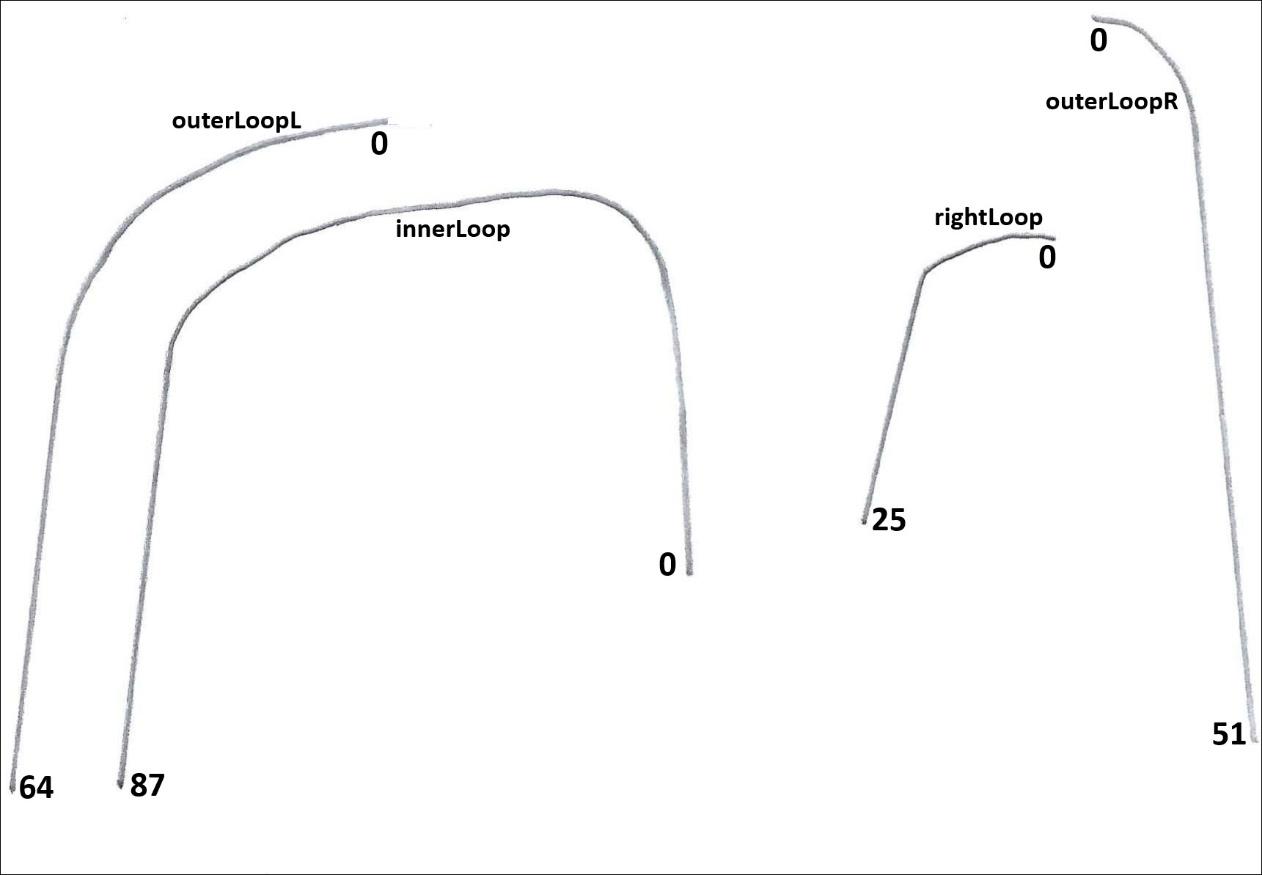
The outer loop has 2 LED strings on the outer edge: one on the left of the playfield and one on the right. There is a gap at the back where LEDs would not be visible:
outerLoopL
outerLoopR
Both the inner loop and right loop have an LED string along their outer edge. Part of the outerLoopR LED string forms the return side of the right loop.
innerLoop
rightLoop
There are 4 rings on the right ramp:
rRampRightRing
rRampCenterRing
rRampLeftRing
rRampExitRing
There are 3 rings on the left ramp:
lRampFrontRing
lRampEnterRing
lRampExitRing
All rings are strictly decorative, although the Right, Center, and Left rings on the right ramp have accelerating magnets behind them.
The rings have light diffusers on the bottom, left, top and right positions, where applicable. Each diffuser has 4 LEDs mounted beneath it. The bottom diffuser of lRampExitRing also serves as the light source for the captive ball translucent cylinder.
The LED strings on the rings never form a complete circle. Some rings extend only slightly beyond 180 degrees (rRampRightRing, rRampCenterRing, rRampLeftRing, lRampFrontRing). On rings that appear complete (rRampExitRing, lRampEnterRing, lRampExitRing), the electrical connection occupies the position of one of the diffusers.
This table lists the positions of the light diffusers on each ring from the player’s point of view.
Ring Name | Bottom | Left | Top | Right |
rRampRightRing | 0 .. 3 | 10 .. 13 | 20 .. 23 | N/A |
rRampCenterRing | 0 .. 3 | 10 .. 13 | 20 .. 23 | N/A |
rRampLeftRing | 0 .. 3 | 10 .. 13 | 20 .. 23 | N/A |
rRampExitRing | N/A | 4 .. 7 | 14 .. 17 | 23 .. 26 |
lRampFrontRing | N/A | 0 .. 3 | 10 .. 13 | 20 .. 23 |
lRampEnterRing | N/A | 5 .. 8 | 15 .. 18 | 24 .. 27 |
lRampExitRing | 5 .. 8 | 15 .. 18 | 24 .. 27 | N/A |
The lRampFrontRing is rotated 90 degrees to the right compared to the other three half rings. The lRampExitRing is rotated 90 degrees to the left compared to the other two full rings. The rRampExitRing has indices shifted down by one compared to the other two full rings.
The front diffusers of the Right, Center, and Left rings on the right ramp are labeled Left for consistency with the other rings and to reflect the slight inclination of the mid backpanel.
The rings naturally divide the ramp LED strings into sections. For example, a lightshow could make a multipart sliding color change starting from each ring.
This table lists the LEDs aligned with the rings.
Ring Name | Inner LED | Outer LED |
rRamprightRing | rightRampInner31 | rightRampOuter41 |
rRampCenterRing | rightRampInner53 | rightRampOuter62 |
rRampleftRing | rightRampInner74 | rightRampOuter83 |
rRampExitRing | rightRampInner96 | rightRampOuter121 |
lRampFrontRing | leftRampInner0 | leftRampOuter0 |
lRampEnterRing | leftRampInner19 | leftRampOuter49 |
lRampExitRing | leftRampInner43 | leftRampOuter67 |
To create lightshows programmatically based on the physical positions of the LEDs, you can normally rely on the locations assigned by the module driver:
p3.LEDs[ledName].Location
Unfortunately, the locations assigned by the CCR module driver are optimized for clarity in the LED Simulator rather than for physical accuracy. While the ramp and loop LEDs are positioned reasonably well, the ring LEDs do not reflect their actual physical locations.
To make matters worse, the CCR module driver never assigns locations to the clear LEDs on the rings, leaving their Location property null.
To create lightshows based on physical locations including the rings, you will need to measure the physical locations yourself.
The CCR module contains many LEDs, so it can appear very bright when all LEDs are illuminated with bright colors. To maintain a reasonable brightness level, consider leaving some LEDs off (for example, using a chaser pattern), using bright colors only briefly to create a flashing effect, or selecting less intense colors.
This example illuminates the rings with the diffused LEDs in white and the clear LEDs in blue.
using System.Collections.Generic; public struct RingSegment { public bool IsDiffused; public int First; public int Last; public RingSegment(bool isDiffused, int first, int last) { IsDiffused = isDiffused; First = first; Last = last; } } public static readonly RingSegment[] HalfRingSegments = new RingSegment[] { new RingSegment(true, 0, 3), new RingSegment(false, 4, 9), new RingSegment(true, 10, 13), new RingSegment(false, 14, 19), new RingSegment(true, 20, 23) }; public static readonly RingSegment[] RightRampExitSegments = new RingSegment[] { new RingSegment(false, 0, 3), new RingSegment(true, 4, 7), new RingSegment(false, 8, 13), new RingSegment(true, 14, 17), new RingSegment(false, 18, 22), new RingSegment(true, 23, 26), new RingSegment(false, 27, 33) }; public static readonly RingSegment[] LeftRampFullRingSegments = new RingSegment[] { new RingSegment(false, 0, 4), new RingSegment(true, 5, 8), new RingSegment(false, 9, 14), new RingSegment(true, 15, 18), new RingSegment(false, 19, 23), new RingSegment(true, 24, 27), new RingSegment(false, 28, 33) }; public static readonly Dictionary<string, RingSegment[]> RingSegments = new Dictionary<string, RingSegment[]>() { { "rRampRightRing", HalfRingSegments }, { "rRampCenterRing", HalfRingSegments }, { "rRampLeftRing", HalfRingSegments }, { "rRampExitRing", RightRampExitSegments }, { "lRampFrontRing", HalfRingSegments }, { "lRampEnterRing", LeftRampFullRingSegments }, { "lRampExitRing", LeftRampFullRingSegments } }; private void UpdateLEDs() { foreach (string ring in RingSegments.Keys) { UpdateRing(ring); } } private void UpdateRing(string ring) { foreach (RingSegment segment in RingSegments[ring]) { ushort[] color; if (segment.IsDiffused) color = Multimorphic.P3.Colors.Color.White; else color = Multimorphic.P3.Colors.Color.Blue; for (int i = segment.First; i <= segment.Last; i++) { LEDHelpers.OnLED(p3, LEDScriptsDict[ring + i], color); } } } |
This example illuminates the captive ball translucent tube in red:
for (int i = 5; i <= 8; i++) { LEDHelpers.OnLED(p3, LEDScriptsDict["lRampExitRing" + i], Multimorphic.P3.Colors.Color.red); } |